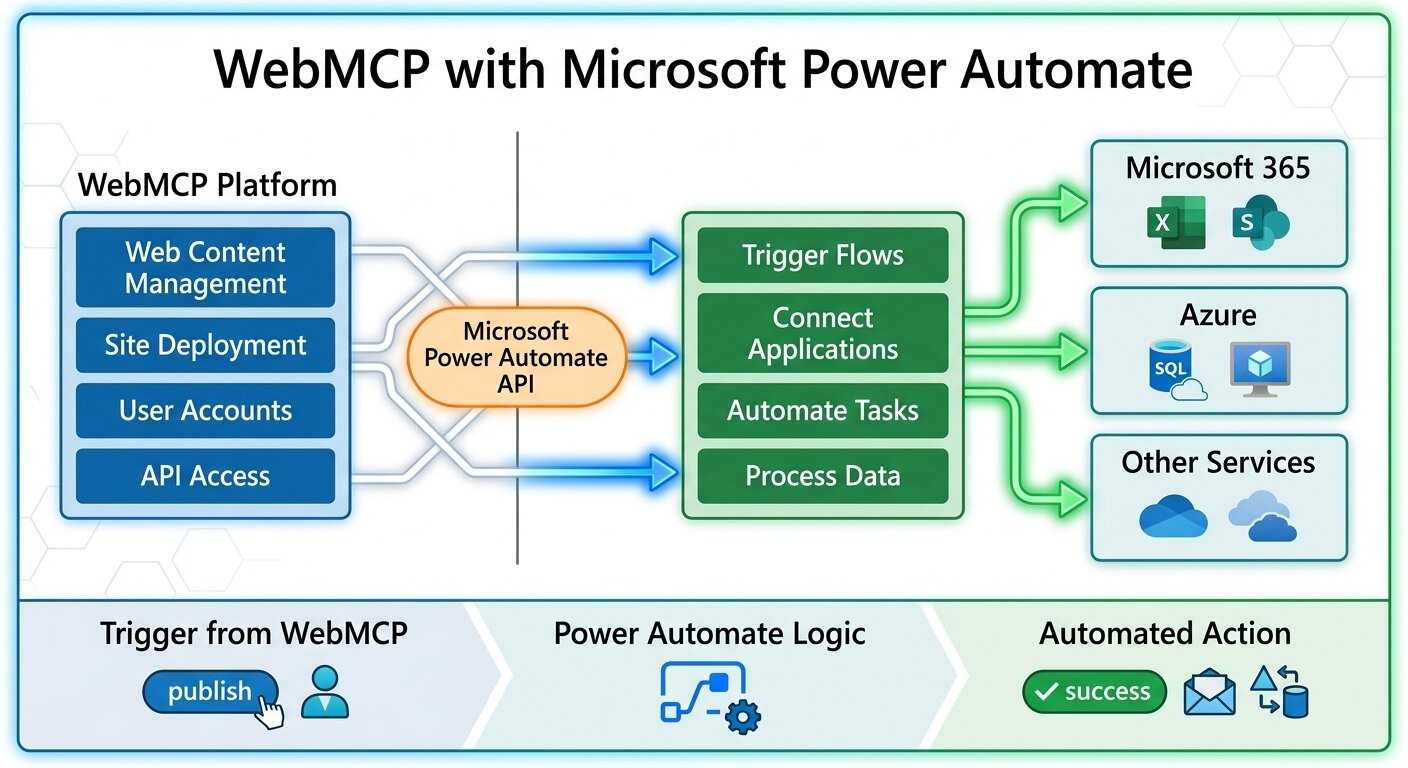
Using WebMCP with Microsoft Power Automate: Workflow Guide
Modern businesses have already outgrown basic automation solutions. Businesses are now using intelligent systems that provide AI-driven interaction and augmented workflow. It is with structured automation across all web-based applications and cloud-based solutions.
This shift towards machine learning is where WebMCP Power Automate integration will add great value. Web MCP will provide a structured AI interaction layer exposing machine-readable workflows. This allows Microsoft Power Automate to help businesses automate operational processes with web-based applications. The combination of WebMCP and Microsoft Power Automate will create a scalable automation ecosystem where enterprise workflows, machine learning systems, web-based applications and APIs can interact with one another without any interference.
As businesses continue to explore AI automation workflows Microsoft environments. This combination will increasingly be used to produce fast operational efficiencies, scale rapidly and build long-term readiness for AI applications.
What is WebMCP?
WebMCP is a machine-readable framework that allows websites to expose structured tools, workflows and capabilities of AI systems. Instead of relying on AI to interpret and execute visual website interfaces, Web MCP will provide clearly defined, structured interaction layers to allow developers and users of AI systems to identify and execute actions as they are defined.
Actions may include:
- Form submissions
- Service inquiries
- Appointment requests
- E-commerce workflows
- Content retrieval
- Customer support actions
Websites created using Microsoft Web MCP instead of traditional HTML will create an AI-enabled website supporting automated interactions with the public. As opposed to simply having a typical browser-driven experience.
What is Microsoft Power Automate?
Microsoft Power Automate is a cloud-based platform that enables companies to connect their systems and automate tasks. Thus, streamlining processes through the automation of various tasks performed across multiple applications and systems.
Typical uses for Microsoft Power Automate include the following:
- Automate CRM
- Lead routing
- Automate email workflows
- FIle management
- Approval workflow
- Synchronization of data
- Internal operations automation
The main function of Microsoft Power Automate is to create workflows. It automates the execution of operational processes between Microsoft systems and any third-party systems. There is one critical element that is often overlooked in the automation process in relation to the website. But websites themselves are often the missing piece in automation infrastructure. This is where WebMCP Power Automate integration becomes strategically important.
Traditional Website Automation Limitations
Most websites were initially created for human interaction and not AI automation. The most common automation approaches today rely on:
- Static APIs
- Manual integrations
- Visual scraping
- Form-based triggers
- Loose interconnected workflows
While these are valid ways of automating certain functions, they are generally limited by the fact that they do not use a structured machine-readable architecture.
The result is primary limitations:
- AI systems must rely on trial and error to determine the functions of a website
- Automation workflows do not scale well
- APIs may expose data, but not website actions
- Manual integration maintenance increases operational complexity
Without a structured architecture that is compatible with AI, websites will stay disconnected from intelligent automation ecosystems.
Power Automate is Not Enough
Many businesses believe that Microsoft Power Automate is a complete solution for automating website interactions. While Power Automate provides a lot of capabilities in respecting automated workflows, it doesn’t solve machine-readable challenges inherent in websites.
- Automation provides capabilities for automating systems.
- Web MCP provides a structured way for websites to be used with AI.
This is important to understand.
Without WebMCP:
- AI agents will not have sufficient knowledge of website capabilities to provide intelligent automation
- Forms will not have structured definitions for interactions
- Workflows on a website will continue to be difficult for automation to execute
- API’s may provide raw data only, with no understanding of usable capabilities
Web MCP operates as the structured layer to facilitate communication between the AI systems, engines and websites.
How WebMCP Power Automate Integration Works
The integration workflow typically has an automated workflow structured on layers.
Step 1: WebMCP Defines Website Functionality
WebMCP exposes actions on the web in a way that can be read by AI. These are structured workflows that would involve things like the following:
- The ability to create a contact form
- Book a service
- Request a service or product
- Does transaction work for e-commerce
- Create a flow for submitting a customer service request
Each of these workflows has structured schemes and endpoints that AI can access.
Step 2: AI Systems Trigger an Action
AI agents, assistants, automation bots or APIs can interact with the workflows programmatically. The AI systems do not interact with the workflows by navigating through the website. Rather, they interact with the workflows by communicating directly with the automation layers that were created when the website was developed.
Step 3: Power Automate Executes Operational Workflows
When a workflow is triggered, Microsoft Power Automate will orchestrate the execution of the workflow across all integrated systems. These operations include, but are not limited to:
- Updating the CRM systems
- Sending an email notification
- Creating an internal task
- Synchronizing databases
- Ticket routing systems
Step 4: The Connected Business Systems Respond
Once the automation sequence has triggered all the ERP, cloud and operational platforms. This will receive the request. The automated process will continue through the connected business systems. This creates scalable AI automation workflows Microsoft businesses that can be used in multiple business units and business processes.
WebMCP Basic Architecture + Power Automate
Generally, the high-level architecture for connecting WebMCP Power Automate consists of the following components:
Website Layer
A public-facing website through which users and AI interact.
WebMCP Structured Workflow Definition
A set of machine-readable format definitions to describe the workflows and actions on a website.
API Communication Layer
Endpoints to send and receive structured requests to and from various other systems and trigger automated actions.
Power Automate Workflow Engine
Orchestration engine for executing workflows.
Business System Layer
CRMs, databases, support, cloud storage, notifications and operational software. The layered architecture above formed intelligent automated systems, allowing for scalable interaction with AI.
Practical Automation Use Case for Workflows
The flexibility of WebMCP Power Automate provides businesses with the ability to automate a variety of operational scenarios.
Lead Generation Automation
An AI assistant is asked:
“Request price information from this company.”
The AI agent recognizes the machine-readable form using WebMCP and submits the request on the user’s behalf.
Power Automate would then:
- Create a lead in the CRM
- Send sales notifications
- Assign follow-up tasks
- Trigger automated email sequences
Thereby, from initial request through lead management, the entire process becomes automated.
Workflow Automation of Customer Support
The customer contact is submitted to the support system. It is through a WebMCP-enabled support workflow and then processed with the help of Power Automate.
- The support ticket is created
- The right department is identified to process the request
- The agent who will handle the case is notified
- All internal databases are updated
- Escalation processes can be initiated if necessary.
The result is operational efficiency and a reduction in manual processing.
Workflow Automation for Healthcare Appointments
Health service providers use workflow automation for scheduling appointments by taking advantage of the structured nature of AI-compatible systems.
The AI assistant:
- Retrieves appointment availability
- Submits requests for booking
- Triggers the workflow for scheduling.
Power Automate supports the following:
- Syncing calendars
- Notifying the clinical staff of the arrival of the patient
- Sending reminders to the patient
- Managing a reminder system
Lead Routing for Real Estate Agencies
Real estate agencies use AI systems to automatically collect inquiries from prospective purchasers. The workflow for processing leads is structured by WebMCP, while Power Automate provides the routing function for inquiries based on:
- Property type
- Location
- Price range
- Availability of agents
As a result, agencies can respond to inquiries much faster and coordinate their operations more effectively.
Automation of Workflows for Ecommerce
E-commerce businesses can integrate the following:
- Product inquiries
- Investor updates
- Order processing
- Shipping
- Custom data synchronization
AI agents interact directly with machine-readable actions of e-commerce enterprises, while Power Automate controls the operational execution of these actions.
Who Can Benefit From Working With WebMCP Power Automate?
Integration can be an important resource for all companies whose work requires a great deal of automation.
The best candidates:
- SaaS developers
- eCommerce sites
- Agencies
- Companies with a huge number of employees
- Customer support departments
- Companies with multiple locations
- Healthcare service providers
- Real estate organizations
- Businesses that provide services
Anyone looking to implement AI-integrated business automation can find value by building an automated workflow structure.
The Advantages of Integrating WebMCP Power Automate
Businesses using WebMCP Power Automate will benefit from many different aspects, such as:
- Web-based business intelligence systems
- Greater degrees of operational improvement
- Highly scalable & flexible automated workflows
- Better visibility into workflow processes
More advanced & responsive digital systems to support existing AI-driven workflows
Implementation Issues
While integration has many advantages, it does require thought-through technical planning for successful implementation.
Typical Implementation Issues:
- Aged CMS platforms
- Inefficient API Mapping
- Difficulty scaling automated workflows
- Configuration for proper authentication
- Conflict between different plugins
- Managing and validating data that flows through multiple departments
- Ensuring that the organization is using structured data across all divisions
If the systems that provide the automated services are poorly built, they will not be able to provide value through scalability.
Security and Compliance Considerations
Enterprise automation system security is a critical component. Businesses implementing AI automation workflows Microsoft environments should include:
- Authentication through OAuth
- Access control
- APIs permissions management
- Validation of requests
- Logging of events or audit trails
- Rate limiting
- Spam protection
- Compliance monitoring
Responsible architecture for the automated system will also be necessary for reliable operations and protecting your data.
The Future of AI Workflow Automation
Today’s digital infrastructure continues to evolve into advanced intelligent automated ecosystems where AI and automation will operate independently to manage workflow processes.
Digital platforms are being transformed from static interfaces into fully functional AI-enabled platforms capable of:
- Managing customer interaction independently through AI
- Intelligent orchestration of workflows
- AI-driven business process
- Machine-assisted service delivery
- Automatically coordinated national infrastructure
Next-generation AI-enabled automation frameworks like WebMCP will be useful for defining this next phase of AI-enabled automation in the workplace.
FAQs:
WebMCP automates workflows and recycles existing website techniques through the unstructured data automation connection of WebMCP to Microsoft’s Power Automate automation system.
WebMCP provides a structure and understanding of how to work with existing web-based operations for AI and automation systems.
Yes, an AI agent can trigger a Power Automate automated workflow by executing a WebMCP structured workflow.
SaaS companies, e-commerce companies, agencies, healthcare facilities and enterprise operation teams will derive tremendous benefit.
Yes, WebMCP supports the creation of scalable, AI-compatible workflows that are appropriate for use in enterprise environments to automate workflows.
The Final Words!
WebMCP Power Automate provides a scalable framework for establishing intelligent automation systems. The combination of a machine-readable website structure and enterprise workflow orchestration creates the ability for a business to automate its interactions, optimize its operational processes and increase the degree to which its AI interacts with its digital systems.
Since the way AI-driven interactions will continue to evolve, early adopters of structured workflow infrastructure will have a very competitive and operational advantage.
The future of automation is not only about connecting software. It will also be about allowing intelligent systems to seamlessly connect with websites, workflows, and their operational infrastructure.
Building A Workflow Infrastructure Ready for AI
When preparing to operate in an AI-driven environment, businesses need more than just basic automation tools. They will require structured systems that can support large volumes of AI-driven interactions, orchestrate workflows and have a machine-readable digital infrastructure. Implementing WebMCP Power Automate will be accomplished in an efficient manner if the right architecture is in place, effective workflow planning exists and a defined automation strategy exists. To achieve these objectives, an organization can use a partner such as WebMCP to build secure, scalable and future-proof automation ecosystems for sustained growth.